Photo to Diamond Painting: Check the Image First
Check your photo on a real drill grid before paying for a custom canvas. Tight cropping beats buying blindly: a tight portrait on 30 × 40 cm gives a face more drills than a wide uncropped shot on 60 × 80 cm.
Free online grid previewer · runs 100% in your browser
Photo to diamond painting grid previewer
Select a photo from your device (nothing is uploaded to any server) or click a built-in test image to see how canvas size, drill shape, color limit and crop zoom change readable detail.
Composition preview only: simulates grid resolution and color quantization locally in your browser. Need a full DMC color chart or custom kit preview? Open DiamondPaintingConverter.com once your crop passes here.
Why tight cropping beats buying a bigger canvas blindly
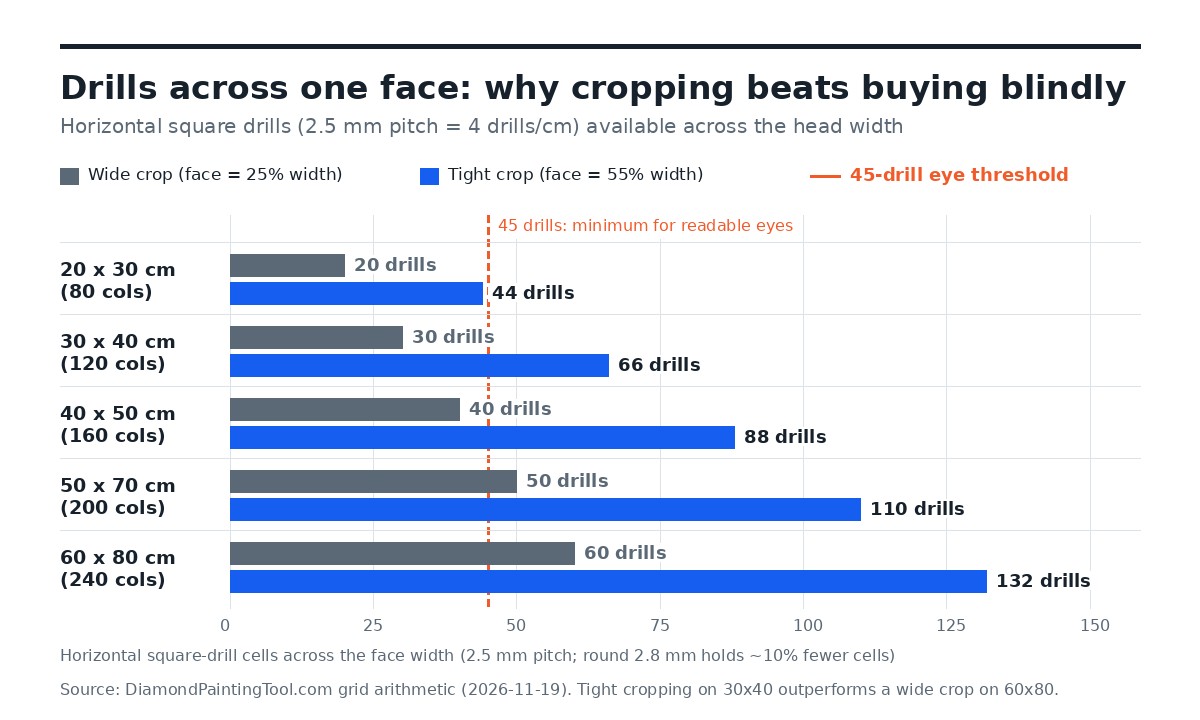
Most blurry custom kits fail at the crop step, not the converter step. When a head takes up only 25 percent of a 60 × 80 cm frame, it gets 60 square drills across. Crop the same portrait tightly so the head fills 55 percent of a 30 × 40 cm canvas, and it gets 66 drills across—more facial detail in a quarter of the drills and a fraction of the completion time.
Minimum canvas grid by photo subject
Match your subject to a realistic grid count before running any free online image to diamond painting converter. Round 2.8 mm drills hold about 10 percent fewer cells per edge than square 2.5 mm drills, so step up one size when choosing round drills for faces.
| Photo subject | Min. square grid | Recommended drill field | Biggest blur trap |
|---|---|---|---|
| Bold icon, flower or silhouette | 80 × 100 (8,000 drills) | 20 × 25 or 30 × 30 cm | Low contrast between subject and backdrop |
| One pet close-up (head & chest) | 120 × 160 (19,200 drills) | 30 × 40 cm (tight crop) | Dark fur merging into a dark room background |
| One person portrait | 160 × 200 (32,000 drills) | 40 × 50 cm | Full-body shot leaving eyes under 45 drills wide |
| Two-person couple or pet + owner | 200 × 280 (56,000 drills) | 50 × 70 cm | Empty sky or wall stealing half the grid |
| Group photo (3+ faces) or fine text | 240 × 320 (76,800 drills) | 60 × 80 cm minimum | Thin letters or distant faces collapsing to blobs |
Choose a photo with one clear subject
A face, pet or object should occupy most of the frame. Distant group photos divide limited cells among many features. Use the original camera file rather than a screenshot, and avoid heavy filters that flatten natural edge and color separation.
Check the file at full zoom first: a photo that is sharp on your phone stays sharp when the converter maps it onto a grid. A picture saved from a messaging app or social feed has already lost edge detail to compression, and no converter can reconstruct pixels that are gone.
What a diamond painting photo converter can and cannot fix
A diamond painting photo converter performs three exact jobs: it resamples your photo onto a fixed grid of cells, quantizes subtle gradients down to a workable DMC palette and maps each cell to a printed symbol chart. That removes hours of manual charting.
What no free online converter can fix is a weak source image. Motion blur, a tiny subject lost in background clutter and skin tones that blend into the wall carry straight onto the printed canvas. A clean preview confirms that the software ran; it does not guarantee the portrait reads from across the room.
Match detail to the grid and viewing distance
Eyes, glasses, lettering and thin whiskers vanish when only four or five cells describe them. Use the diamond painting size calculator to confirm whether a seller’s listing quotes the drill field or the full outer canvas (which trims roughly 5 cm per edge), and check the viewing distance guide before ordering.
Once you pick a canvas size, convert that drill count into real hours and weekly sessions in the diamond painting calculator so a 56,000-drill portrait does not stall halfway through.
Create a full DMC kit preview
After your crop passes the browser grid check above, open DiamondPaintingConverter.com with the original unedited file to generate a full DMC color preview and compare round against square output. Then return to the diamond painting tool guide for pen, tray, storage and framing checks.
Questions about converting a photo to diamond painting
Can you convert a photo to diamond painting free online without uploading it?
Yes. The grid previewer above runs locally in your browser using HTML canvas so your photo never leaves your device. It shows exact grid resolution and detail loss across 20 × 25 to 60 × 80 cm before you upload anywhere for a full DMC chart.
What should I check before using an image to diamond painting converter?
Check sharpness at full zoom, crop tightly around one clear subject, verify strong light-dark separation around faces and confirm at least 45 horizontal drills across any face you expect to recognize.
Why does my converted diamond painting preview look blurry?
Either the canvas grid is too small for the number of faces in the frame, or empty background is eating cells your subject needs. Test a tighter crop in the previewer above before stepping up to a larger canvas.
Are square or round drills better for custom photo diamond paintings?
Square 2.5 mm drills pack roughly 10 percent more cells per side (160 × 200 on 40 × 50 cm vs 142 × 178 for round 2.8 mm) with no corner gaps, which sharpens portraits. See the full round versus square drills guide for placement trade-offs.